













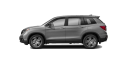


|
Página de información del producto:
Honda Navigation (MapCare)
|
|||||||
|
GUÍA DE INSTALACIÓN:
GUÍA DE INSTALACIÓN COMPLETA (inglés/francés/español): HAGA CLIC AQUÍ
INSTALACIÓN PASO A PASO:
|
|
||||||
|
CONSIGLI UTILI:
1) Risoluzione dei problemi e domande frequenti: HAGA CLIC AQUÍ
Before calling our Contact Center, please review the Troubleshooting guide Antes de ponerse en contacto con nuestro centro de atención al cliente, consulte la guía de resolución de problemas. 2) Si su suscripción muestra una fecha de caducidad en la década de 1970, envíe un correo electrónico o chatee con nuestro centro de atención al cliente con su número de identificación del vehículo (VIN) y solucionaremos este problema. 3) Las suscripciones incluyen (si procede según la región): Tráfico en tiempo real: Visualización del tráfico, incluyendo el flujo de tráfico y los incidentes. Información sobre el tráfico y eventos de tráfico (descripción, distancia, etc.). Tráfico cercano y a lo largo de la ruta. Optimiza el cálculo de la ruta. Búsqueda de PDI por número de teléfono: Busca un punto de interés (PDI) por número de teléfono. Actualización del mapa del sistema de navegación mediante Wi-Fi o unidad USB: •Actualización de la región de origen (Wi-Fi): instala y actualiza el mapa de la región de origen con una conexión Wi-Fi. •Actualización de la región seleccionada (Wi-Fi): instala y actualiza el mapa de la región deseada con una conexión Wi-Fi. •Actualización completa del mapa (USB): instala y actualiza el mapa completo con una unidad flash USB.
COMPATIBILITY: CIVIC 2022-2026 CR-V 2023-2026 E:Ny1 2023-2025 HR-V 2022-2026 ZR-V 2023-2026 |
|||||||
